


概括
在这篇博文中,我将介绍ESLint和Prettier如何在ReactNative和React上配置并运行的。并且我将介绍husky和lint-staged的代码规范配置操作。 你可以在github地址上看到eslint和prettier最终的配置。eslintrc-prettier 至于对ReactNative的使用,请参考博文:react-native的开发使用
ESLint
由于react native cli模版中自带eslint和prettier,版本有可能不是最新,所以我们需要先进行删除卸载,删除.eslintrc.js文件和.prettierrc文件,然后再统一安装。
yarn remove eslint prettier eslint-plugin-prettier
//or
npm uninstall eslint prettier eslint-plugin-prettier
安装ESLint
eslint是es(ecmaScript)+ lint(show error code)的复合语言,分析源代码,使他们具有相同的代码风格的工具。 在react native项目中执行下面的命令。
yarn add -D eslint或者
npm install --save-dev eslint配置ESLint
安装好eslint后,我们就开始在react-native配置eslint(react项目类似)。
初始化eslint
执行下面命令进行初始化
npx eslint --init我们在终端可以看到下列步骤
? How would you like to use ESLint? (Use arrow keys)
  To check syntax only
  To check syntax and find problems
❯ To check syntax, find problems, and enforce code style我选择了To check syntax, find problems, and enforce code style检查样式并且自动修复它。
? What type of modules does your project use? (Use arrow keys)
❯ JavaScript modules (import/export)
  CommonJS (require/exports)
None of these在rn中,主要是用到import/export,故选择JavaScript modules (import/export),回车下一步
? Which framework does your project use? (Use arrow keys)
❯ React
  Vue.js
None of these这一步毋庸置疑选React
? Does your project use TypeScript? (y/N)我们使用typescript集成react native,所以选y
? Where does your code run? (Press <space> to select, <a> to toggle all, <i> to invert selection)
 ◯ Browser
❯◉ Node
react native 不在浏览器上运行,所以只选择Node, react 选择这两个,这里不同于其他选项,按空格键进行选择,回车键下一步
? How would you like to define a style for your project? (Use arrow keys)
  Use a popular style guide
❯ Answer questions about your style
Inspect your JavaScript file(s)这里是通过eslint实现什么样的风格,我选择了Answer questions about your style自定义风格
? What format do you want your config file to be in? (Use arrow keys)
  JavaScript
  YAML
❯ JSON
这里是选择要创建的eslint文件,我们选择JSON
? What style of indentation do you use? (Use arrow keys)
❯ Tabs
  Spaces
这里可以根据你的习惯来进行设置缩进样式,我选择的是tab
? What quotes do you use for strings? (Use arrow keys)
  Double
❯ Single
我选择单引号
? What line endings do you use? (Use arrow keys)
❯ Unix
Windowsmac用户,选择Unix
? Do you require semicolons? (Y/n)选择是否分号结尾,这里我选择Y
The config that you've selected requires the following dependencies:

eslint-plugin-react@latest @typescript-eslint/eslint-plugin@latest @typescript-eslint/parser@latest
最后一步安装依赖。
详细配置eslint
因为刚开始选择了Answer questions about your style设置eslint,所以我们需要更改.eslint.json文件。
首先我们执行下面命令安装需要的插件
yarn add -D eslint-plugin-react @typescript-eslint/eslint-plugin @typescript-eslint/parser eslint-plugin-react-hooks配置.eslint.json文件
{
    "env": {
        "node": true,
        "es2021": true,
        "jest": true
    },
    "extends": [
        "eslint:recommended",
        "plugin:react/recommended",
        "plugin:react-hooks/recommended",
        "plugin:@typescript-eslint/eslint-recommended",
        "plugin:@typescript-eslint/recommended",
    ],
    "overrides": [],
    "parser": "@typescript-eslint/parser",
    "parserOptions": {
        "ecmaVersion": "latest",
        "sourceType": "module",
        "ecmaFeatures": {
            "jsx": true
        }
    },
    "plugins": [
        "import",
        "react",
        "react-hooks",
        "@typescript-eslint"
    ],
    "rules": {
        "no-console": "error",

        "indent": "off",

        // import
        "import/order": [
          "error",
          {
            "pathGroups": [
              {
                "pattern": "react",
                "group": "external",
                "position": "before"
              },
              {
                "pattern": "@/**",
                "group": "external",
                "position": "after"
              }
            ],
            "pathGroupsExcludedImportTypes": ["react"]
          }
        ],
        "import/first": "error",
        "import/no-mutable-exports": "error",
    }
}
在package.json中添加script执行lint
{
  "scripts": {
    "tsc": "tsc --noEmit",
    "lint": "eslint . --fix --ext .js,.jsx,.ts,.tsx"
  },
}可以执行yarn lint看code是否配置成功。
在vscode上使用eslint
如果是使用vscode,就要安装eslint插件
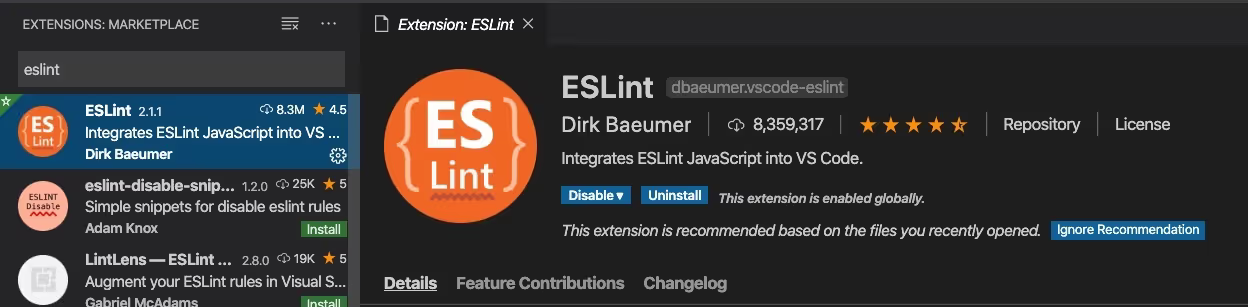 在项目的.vscode的react目录下创建
setting.json文件,并添加下面的code,保存文件时,eslint就会自动修复。
{
  "editor.codeActionsOnSave": {
    "source.fixAll.eslint": true
  }
}
配置prettier
Prettier 是一个 Code Formatter,按规则制作相同的代码风格。ESLint 是一种 JavaScript 的代码格式化器,Prettier 是所有源代码的代码格式化器。
执行下面命令安装prettier
yarn add -D prettier eslint-plugin-prettier修改.prettier文件
{
  "arrowParens": "avoid",
  "singleQuote": true,
  "semi": true
}
在eslint上配置prettier
{
  extends: [
    ...
    "plugin:prettier/recommended"
  ]
}
在vscode上使用prettier
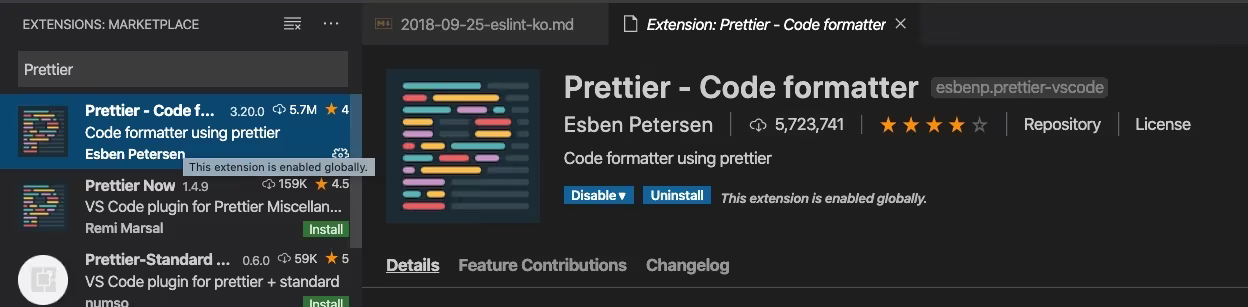 在.vscode/react文件目录下添加下面json
{
  "editor.defaultFormatter": "esbenp.prettier-vscode",
  "editor.formatOnSave": true
}
如果想配置 import 成员排序可参考: 如何使用eslint-plugin-import进行import成员排序? nextjs项目 可以参考这篇文章: 如何给 Next.js 项目配置代码格式化和校验 NextJS-Linter与lint-staged不起作用
接入husky和lint-staged
安装husky
yarn add -D husky然后执行
// npm7及以上可以执行
npm set-script prepare "husky install"

// npm7以下可以执行
npx npe scripts.prepare "husky install"这个命令在package.json的script里添加"prepare": "husky install"
或者手动在script里添加"prepare": "husky install"。
执行yarn prepare就会在项目目录下生成.husky目录。
再执行以下命令生成hook钩子pre-commit
npx husky add .husky/pre-commit "npx lint-staged"⚠️ 注意:window下不要使用node-16版本来执行这个命令,会报错。
这个🐶会在commit的时候执行,执行的是 后面的引号部份yarn run lint
安装lint-staged
yarn add -D lint-staged我在lint的命令执行lint-staged,然后在lint-staged根据匹配的文件进行代码格式化和git add
{
  "scripts": {
    "prepare": "husky install",
    "lint": "eslint . --fix --ext .js,.jsx,.ts,.tsx"
  },
  "lint-staged": {
    "*.{js,jsx,ts,tsx}": [
      "eslint --fix",
      "git add"
    ]
  }
}
这样就在react项目中接入好了eslint、prettier、husky和lint-staged。